Sunday, January 2, 2011

Rooting the Android emulator

There's surprisingly little information out there about how to do this. Perhaps it's because you can already get a root shell on the emulator with adb. But if you're developing an android app that is meant to run su commands on a rooted phone, it won't just magically work in the emulator. I'll explain how to change that, so you won't have to develop and test your su-using apps directly on your phone.

What a rooted phone has that the emulator lacks is a custom su binary and the SuperUser app. The app is easy - just install it with adb. The su binary is a different beast. It requires some custom steps every time you start the emulator. Luckily, it can all be easily automated. I created a batch file that launches the emulator and runs all the necessary commands. For non-Windows users, it should be trivial to convert to a bash script. Explanations are in the script's comments, so I'll let it speak for itself:

@echo off
REM --------------------------------------------------------------------------
REM Starts the android emulator and sets up the custom su executable on the
REM system image. This must be done each time the emulator starts, since the
REM emulator will not persist the system image when it exits (see
REM http://developer.android.com/guide/developing/tools/emulator.html).
REM
REM Usage:
REM * Arguments to this command are passed on to the emulator command. You'll
REM need to pass in an AVD name.
REM * The android sdk tools directory must be your path.
REM * You'll need to put the appropriate su binary in the same directory as
REM this script. You can get it from the zip files linked here:
REM http://forum.xda-developers.com/showthread.php?t=682828
REM * You'll need to a separate, one-time install of the superuser app. Just
REM run adb install with the apk in the zip file from the previous step.
REM
REM
REM A few implementation details:
REM * By default, the emulator's system image has no free space, since it's
REM meant to be read-only. The -partition-size argument makes it bigger so
REM there's space to work with (I gave it a somewhat arbitrary 160MB). The
REM adb remount command gives write access to the system the image.
REM * The emulator is launched via runhidden.js to hide the useless console
REM window that pops up.
REM --------------------------------------------------------------------------

if (%1)==() echo "MUST SPECIFY AN AVD!" && exit /B
cd /d %~dp0
@echo on

wscript runhidden.js "emulator -partition-size 160 %*"
adb wait-for-device
adb remount
adb push su /system/bin
adb shell chmod 6755 /system/bin/su
adb shell rm /system/xbin/su
adb shell ln -s /system/bin/su /system/xbin/su


Here is the source for runhidden.js:

// Runs a command with it's initial window hidden. Useful for programs that
// allocate a useless console (many java apps do this, and you don't always
// have the ability to run them with javaw).
//
// Requires the entire command to be passed in as the first parameter
// (because WSH doesn't provide simple access to the entire command line).
WScript.CreateObject("WScript.Shell").Run(WScript.Arguments(0), 0)


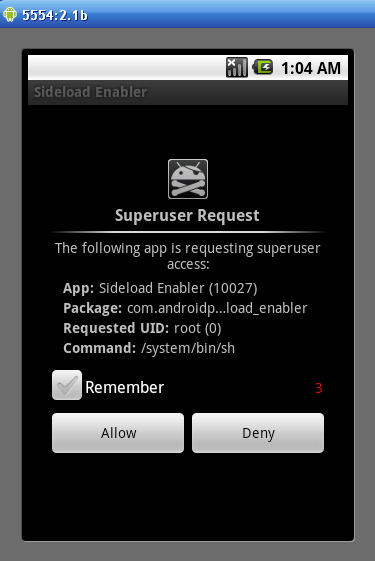
Screenshot of a superuser request in the emulator:
Enhanced by Zemanta

Monday, December 27, 2010

Quick workaround for broken handling of Play/Pause key in Winamp

The Play/Pause key on the Microsoft Natural Keyboard 4000 (and other media keyboards) doesn't work properly when Microsoft's Intellitype software is running. Somehow Winamp has left this unfixed for years. Here's a workaround:

In the Intellitype settings (Control Panel -> Keyboard -> Key Settings), change the Play/Pause key to a macro that sends some other keystrokes, e.g., Ctrl+Shift+* (Intellitype makes the Alt-key hard to record, so I leave it out). Then, in Winamp's settings, enable global hotkeys and change the Playback: Play/Pause hotkey to the same value.


Saturday, October 9, 2010

Perl one-liner, bumping a version string

This takes a version string like "1.23f" and turns it into "1.23g" (or adds "a" if there's no trailing letter):

perl -lpe 's/([^a-z])$/$1a/ || substr($_, -1) =~ tr/a-z/b-za/'

Wednesday, February 24, 2010

Wordpress Fail

If you have a wordpress blog, try the following:

   1) Create a new post
   2) In the visual editor, start a line with a few spaces followed by some text
   3) Click 'Preview', or click to the HTML tab then back to the Visual tab.

You'll notice your leading spaces have disappeared. Ok, fine, just convert them to &nbsp's in the HTML editor. Now, switch back to the visual editor. Ahh, leading spaces at last. Let's just switch back to the HTML editor for one last tweak. And... the leading spaces are gone again. Welp.

I found one attempt to fix this - unfortunately it's just a bandaid and only works inside shorttags for a specific wordpress plugin.

Tuesday, January 23, 2007

Embedding iTunes album art into MP3s

iTunes makes it really easy to download album art for an entire music library in one fell swoop (select-all, Advanced->Get Album Artwork). It's a little trickier to embed the artwork into the MP3s themselves (for use with other players like WinAmp). I found a perl script at Teridon's iTunes Scripts called itunes_insert_artwork that does a nice job.

While trying it out, I noticed that a lot of the jpegs from iTunes were ridiculously large. Some were over 800K, for a 600x600 image. Not quite sure why - resaving them even at 100% quality resulted in much smaller files. So, I tweaked the script to send the images through ImageMagick first. (At quality 85, those 800K images get down to 200K.)

You'll need to have ImageMagick and PerlMagick installed. If you plan on installing ImageMagick/PerlMagick for ActivePerl, note that, currently, you'll need the older 5.8.x version to get it to work.

Download the script

Saturday, November 25, 2006

KeyFix4000: Improve your MS Natural Keyboard 4000

I'm loving the MS Natural Keyboard 4000, but it does have some issues.

First, it is conspicuously missing a Windows key on the right side. Second, there is no way to remap the back and forward buttons to act as mouse buttons. After googling in futility for a solution, I decided to whip one up myself. (After all, this was nothing a little keyboard hooking couldn't solve.)

The result? KeyFix4000.

The mouse button mapping is pretty straight-forward - it just translates a click on the back/forward button to a click on the left/right mouse button.

The Windows key issue was a little tricky - how do you fix a key that doesn't exist? Well, the Apps key is pretty much where the Windows key should be, and I realized I could overload it. Now, when pressed by itself, it functions as the Apps key, and when pressed in combination with another key, it works as the Windows key. This dual usage works surprisingly well.

Download executable
C++ source code at GitHub